Before you start
- Jobs are scheduled or ready to schedule.
- Crew records are active.
What you'll do
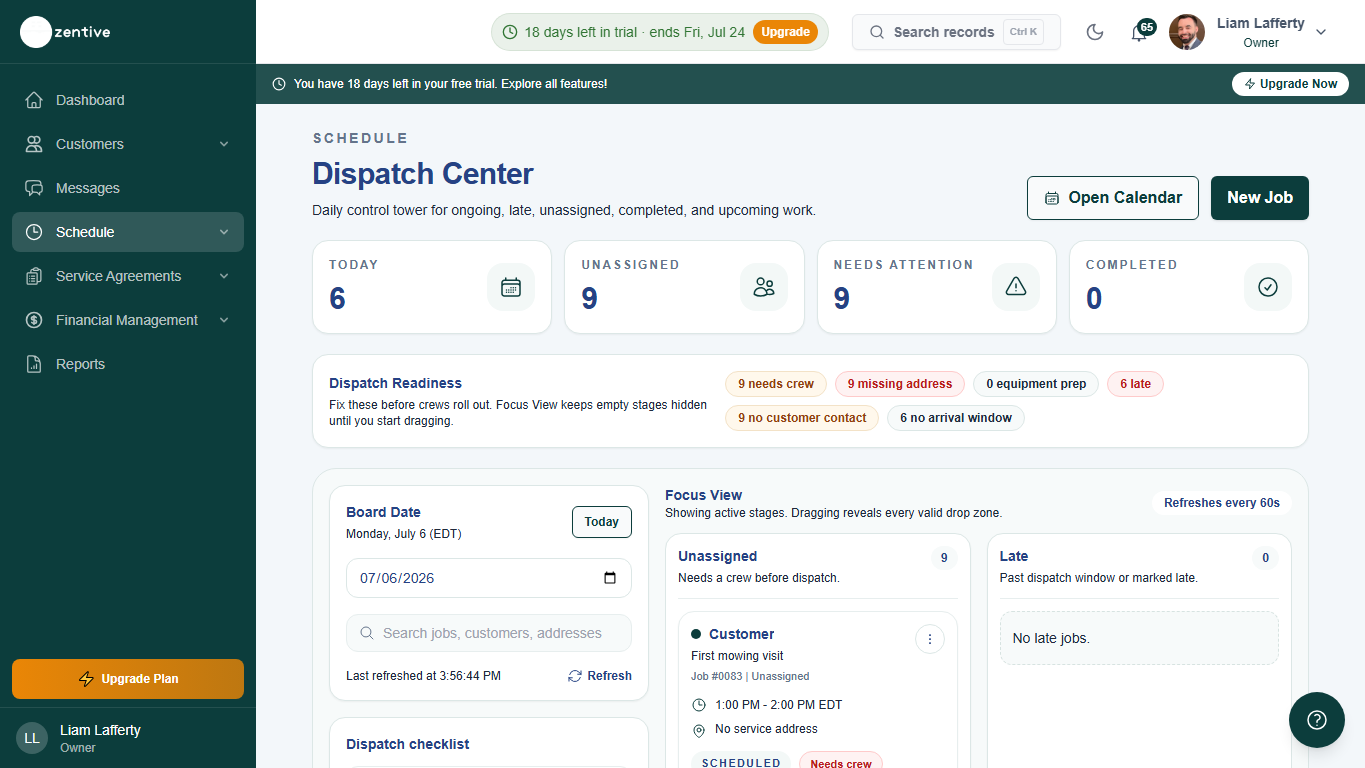
You will use dispatch to spot gaps, assign work, and keep crews from starting the day with missing job details.
Do this
- 1
Open Dispatch Center
Go to Schedule, then Dispatch Center.
- 2
Start with unassigned work
Find jobs with no crew or missing time before reviewing jobs that are already ready.
- 3
Check crew load
Compare each crew's route and job count so one team is not overloaded while another has gaps.
- 4
Open problem jobs
Use the job detail view to add missing notes, materials, customer access details, or crew assignments.
- 5
Confirm field visibility
After changes, verify the crew can see the right jobs from the crew app.
How to use readiness counts
- Use the readiness counts for crew, address, equipment, customer contact, route, and arrival-window gaps.
- Open problem jobs before crews leave the yard.
- Refresh the board after assignments so the crew app and calendar are checking the same day.
Morning dispatch checklist
- Every job has a crew.
- Every crew has a sensible route.
- Customer notes and gate/access details are present.
- Weather or cancellation changes are rescheduled before crews leave.
Was this helpful?
Still need help?
Contact Zentive support
Include your business name, account email, what you were trying to do, what happened instead, and a screenshot if possible. For billing, sync, or login issues, include the exact error message if shown.
Replies by emailLogin, billing, sync, and setup help
Email support